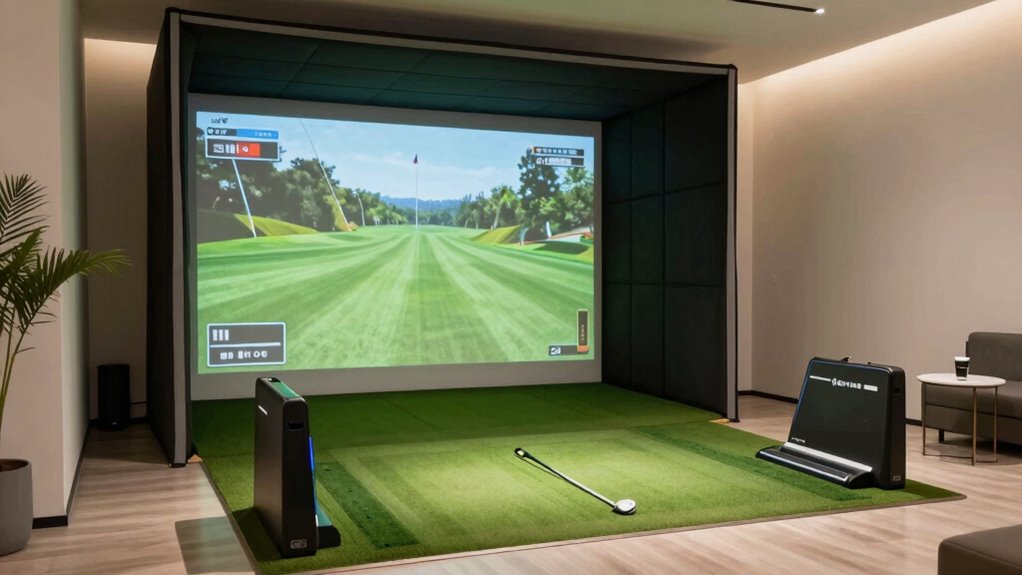
If you’re looking to enjoy golf indoors without sacrificing much space, choosing the right simulator can be a challenge. The best options balance size, performance, and ease of setup. The SkyTrak Golf Launch Monitor stands out as the top overall pick for its accuracy and portability, while the SLX MicroSim offers a compact, mobile solution perfect for smaller rooms. For those on a budget, the Amazgolf Impact Screen provides a simple yet effective setup. Keep in mind, tradeoffs often involve size versus features and ease of use versus realism. Continue reading for a detailed breakdown of each option and what suits your space and needs best.

Get travel and outdoor gear delivered free — and shop member deals
- Fast, free delivery on millions of items
- Access to Prime Big Deal Days deals on October 6–7
- Prime Video, Amazon Music and more included
Complete the kit



Key Takeaways
- Size and portability are the most critical factors when choosing a simulator for small spaces, with compact models like the SLX MicroSim excelling in mobility.
- Impact screens and enclosures vary significantly in footprint; selecting a model that fits your available area is essential to avoid overcrowding.
- Budget options often sacrifice some realism or features but can still provide effective practice environments in tight spaces.
- High-end simulators tend to offer better data accuracy and immersive features but require more space and investment.
- Ease of setup and maintenance influences long-term usability, especially for users with limited technical skills or space constraints.
| SkyTrak Golf Launch Monitor and Simulator with Protective Case |  | Best Overall for Data-Driven Practice in Small Spaces | Functionality: Golf launch monitor and simulator | Parameters Measured: Ball speed, distance, launch angle, club speed, spin rates | Includes: Metal protective case | VIEW ON AMAZON | See Our Full Breakdown |
| Amazgolf Golf Simulator Impact Screen (118 x 78, 98 x 98, 118 x 118, 118 x 138) for Indoor Golf Practice |  | Best for Customizable Indoor Practice Setups | Size options: 118 x 78, 98 x 98, 118 x 118, 118 x 138 | VIEW ON AMAZON | See Our Full Breakdown | ||
| SLX MicroSim Indoor Mobile Golf Simulator with Motion Sensor and Swing Stick |  | Best for Realistic Graphics and Course Play in Small Spaces | Compatibility: Android, iOS, PC | Software: E6 CONNECT | Display: 4K | VIEW ON AMAZON | See Our Full Breakdown |
| Golf Daddy Golf at Home Simulator – AI Swing Analyzer & Practice Trainer |  | Best for No-Ball Swing Practice in Small Spaces | Type: Golf simulator and swing analyzer | Power Source: Not specified | Suitable for: Indoor and outdoor use | VIEW ON AMAZON | See Our Full Breakdown |
| PHIGOLF Home Golf Simulator with Motion Sensor & 3D Analysis |  | Best for Interactive Play and Skill Development in Small Spaces | Compatibility: Android and iOS | Sensor: 9-axis motion sensor | Courses: Over 38,000 | VIEW ON AMAZON | See Our Full Breakdown |
| YUNIC Golf Simulator Impact Cage – Driving Cage with Metal Frame and Impact Screen |  | Best for Compact, Safe Indoor Practice | Frame Material: Metal | Includes: Impact screen | Use: Indoor golf practice | VIEW ON AMAZON | See Our Full Breakdown |
| Rapsodo Mobile Launch Monitor Golf Simulator for iPhone & iPad |  | Best for Data-Driven Practice on the Go | Compatibility: iPhone and iPad (iOS only) | Features: Shot feedback, video replay, shot tracer | Includes: Free Rapsodo app, optional premium features | VIEW ON AMAZON | See Our Full Breakdown |
| Rapsodo MLM2PRO Mobile Launch Monitor Golf Simulator with 3 Chrome Tour Balls |  | Best for High-Precision Data and Course Access | Shot accuracy: Tour level | Metrics captured: 15 key metrics including spin rate, carry distance | Trial period: 45 days | VIEW ON AMAZON | See Our Full Breakdown |
| Complete Golf Simulator Enclosure Package – 4K-Ready Impact Screen with Blackout Cage, Projector Mount, Frame Poles, Side Shank Nets |  | Best for Serious, Immersive Indoor Practice | Impact Screen: 4K-Ready | Includes: Projector mount, frame poles, side shank nets | Warranty: 12 months | VIEW ON AMAZON | See Our Full Breakdown |
| 2 in 1 Golf Simulator Net System, 10 x 8ft Practice Net with Impact Screen, Target Cloth, Foam-Padded Steel Frame, Hitting Mat and Balls |  | Best for Versatile Indoor/Outdoor Practice & Simulation | Size: 10 x 8 ft | Material: Steel frame, impact screen, mesh | Includes: Hitting mat, golf balls, target cloth | VIEW ON AMAZON | See Our Full Breakdown |
| Garmin Approach R10 Portable Golf Launch Monitor |  | Best for Accurate Data and Video Analysis in Small Spaces | Waterproof: IPX7 | Control Method: Application, Voice | Battery Life: Up to 10 hours | VIEW ON AMAZON | See Our Full Breakdown |
| Zealfeel Golf Simulator Enclosure, 10 x 8 ft / 12 x 9 ft, HD Impact Screen |  | Best for Creating a True Golf Practice Space in Small or Larger Rooms | Dimensions: 10ft W x 8ft H x 5ft D | Impact Screen Size: 9ft x 7ft | Material: Heavy-duty steel, tear-resistant impact screen | VIEW ON AMAZON | See Our Full Breakdown |
| golf simulators for small space | Includes |
|---|---|
| SkyTrak Golf Launch Monitor an | Metal protective case |
| Amazgolf Golf Simulator Impact | — |
| SLX MicroSim Indoor Mobile Gol | — |
| Golf Daddy Golf at Home Simula | — |
| PHIGOLF Home Golf Simulator wi | Golf swing stick |
| YUNIC Golf Simulator Impact Ca | Impact screen |
| Rapsodo Mobile Launch Monitor | Free Rapsodo app, optional premium features |
| Rapsodo MLM2PRO Mobile Launch | — |
| Complete Golf Simulator Enclos | Projector mount, frame poles, side shank nets |
| 2 in 1 Golf Simulator Net Syst | Hitting mat, golf balls, target cloth |
| Garmin Approach R10 Portable G | — |
| Zealfeel Golf Simulator Enclos | — |
More Details on Our Top Picks
SkyTrak Golf Launch Monitor and Simulator with Protective Case
This compact launch monitor stands out for its detailed data collection, making it a top choice for serious golfers who want real feedback to improve their swing. Compared with the SLX MicroSim, SkyTrak emphasizes precise launch metrics over immersive graphics, which benefits those focused on technical improvement rather than entertainment. The included durable metal case adds protection during transport, ideal for users with limited space who need to move or store their equipment easily. The main tradeoff is its reliance on a dedicated space for setup and the need for someone to sign for delivery, limiting convenience for some. While it doesn’t include a full simulator enclosure, its emphasis on data makes it perfect for small, dedicated practice areas.
Pros:- Provides detailed real-time golf data such as ball speed and spin
- Includes a rugged, protective metal case for durability and portability
- Offers virtual driving range practice to refine swings
Cons:- Requires a signature for delivery, so someone must be home
- Limited to practice and simulation, no entertainment features
Best for: Golfers seeking accurate, data-rich feedback within a small dedicated space
Not ideal for: Casual players wanting immersive gaming or entertainment without focusing on detailed metrics
- Functionality:Golf launch monitor and simulator
- Parameters Measured:Ball speed, distance, launch angle, club speed, spin rates
- Includes:Metal protective case
- Shipping Requirement:Signature required
Our verdict“This device is ideal for golfers who want precise swing data in a compact setup, but less suited for casual or entertainment-focused users.”
Amazgolf Golf Simulator Impact Screen (118 x 78, 98 x 98, 118 x 118, 118 x 138) for Indoor Golf Practice
Compared to the Golf Daddy system, which offers a high-tech swing analysis without a screen, the Amazgolf impact screen is meant for dedicated indoor simulator setups, emphasizing durability and versatility. Its multiple size options make it adaptable to various small spaces, allowing users to tailor their setup without sacrificing screen quality or practice area. However, the limited product details mean I need to rely on general impressions, and its material quality or ease of installation remains unclear. This impact screen is a practical choice for those who already own or plan to build a full simulator but may fall short for users seeking a plug-and-play experience or detailed material info.
Pros:- Multiple size options to fit various small spaces
- Washable and durable material for long-term use
- Designed specifically for indoor golf practice
Cons:- Limited information on material quality and installation process
- Lacks integrated features or built-in lighting or framing
Best for: Home users wanting a flexible, durable screen for custom small-space golf setups
Not ideal for: Beginners seeking an all-in-one simulator with built-in analysis and entertainment features
- Size options:118 x 78, 98 x 98, 118 x 118, 118 x 138
Our verdict“Ideal for customization-focused golfers who need a reliable impact surface, but less suitable for those wanting an all-in-one simulator system.”
SLX MicroSim Indoor Mobile Golf Simulator with Motion Sensor and Swing Stick
The SLX MicroSim offers impressive 4K graphics and realistic swing analysis, making it stand out for users who want a more immersive experience than the basic launch monitors. Unlike the SkyTrak, which emphasizes data collection, the MicroSim focuses on visual realism and course access, which can motivate casual players or those who enjoy virtual golf for fun. It supports real golf balls and is compatible with both indoor and outdoor environments, but calibration and potential vibration issues when using real balls could impact accuracy. This makes it a solid choice for those who want a compelling visual experience despite some setup and sensitivity considerations.
Pros:- High-quality 4K graphics for immersive virtual courses
- Supports real golf balls and a variety of courses
- Suitable for all ages, including wheelchair users
Cons:- Additional content requires ongoing subscription fees
- Calibration needed for best accuracy with real golf balls
Best for: Golfers seeking immersive course play and realistic graphics within limited space
Not ideal for: Players primarily interested in detailed swing metrics or data analysis
- Compatibility:Android, iOS, PC
- Software:E6 CONNECT
- Display:4K
- Content License:6 months included, $60, expanded $9.99/month
- Sensor Placement:Below the grip
- Use with real golf balls:Yes
Our verdict“This simulator is perfect for those prioritizing immersive visuals and course variety in a small space, but less ideal for data-focused training.”
Golf Daddy Golf at Home Simulator – AI Swing Analyzer & Practice Trainer
The Golf Daddy system distinguishes itself by offering swing analysis without requiring any golf balls, making it ideal for very limited spaces. Compared with the PHIGOLF system, which offers a full course experience, Golf Daddy focuses solely on swing correction and feedback, making it a practical choice for daily practice without clutter. Its AI-powered feedback is a notable advantage, especially for players who prefer dry swings or have space constraints. However, the lack of detailed device compatibility info and uncertain app features could limit its appeal for tech-savvy users. This pick makes sense for those who want consistent swing improvement without the need for a large setup or ball return system.
Pros:- AI-powered swing analysis provides accurate feedback
- No balls needed, ideal for small spaces and indoor use
- Easy to set up and portable for frequent practice
Cons:- Device compatibility and app features are not fully detailed
- Limited information on power or subscription costs
Best for: Golfers who want effective swing training without space-consuming equipment or balls
Not ideal for: Players seeking real course play, immersive graphics, or comprehensive game modes
- Type:Golf simulator and swing analyzer
- Power Source:Not specified
- Suitable for:Indoor and outdoor use
- Features:AI swing analysis, no ball practice, real-time feedback
Our verdict“This system is perfect for those focusing on swing mechanics in tight spaces, but less suited for those wanting full-course simulations.”
PHIGOLF Home Golf Simulator with Motion Sensor & 3D Analysis
The PHIGOLF system offers a highly engaging experience with its 9-axis motion sensor and access to over 38,000 courses, making it stand out for users who want more than simple swing feedback. Unlike the Golf Daddy, which focuses on swing correction, PHIGOLF emphasizes full-body tracking and game modes, suitable for families or multiplayer sessions in limited space. Its compatibility with both Android and iOS and its AI coaching features can help players of all skill levels improve while having fun. However, setup can be tricky for some, and the use of a swing stick or attaching the sensor to a real club may pose challenges for certain users. This makes it a great choice for interactive, skill-building practice in small areas, provided space and device compatibility are manageable.
Pros:- Includes AI swing coaching and full-body pose tracking
- Access to a vast library of over 38,000 courses
- Supports multiplayer and online play for social golf
Cons:- Requires compatible devices and some setup effort
- Indoor use may be limited by available space
Best for: Families or casual players who want engaging, multiplayer, and skill-based golf practice in small rooms
Not ideal for: Serious data-driven golfers or those with limited space for full motion tracking setup
- Compatibility:Android and iOS
- Sensor:9-axis motion sensor
- Courses:Over 38,000
- Includes:Golf swing stick
- Features:AI swing coaching, pose tracking
Our verdict“This system suits casual and family users looking for interactive and social golf fun in small spaces, but less ideal for purely data-focused training.”
YUNIC Golf Simulator Impact Cage – Driving Cage with Metal Frame and Impact Screen
This impact cage stands out for its sturdy metal frame and durable impact screen, making it ideal for those who want a safe, contained space for practicing drives indoors. Compared to the more comprehensive Complete Golf Simulator Enclosure Package, it offers less in terms of immersive visuals but excels in safety and ease of assembly. Its main tradeoff is the need for a sufficiently large room and a higher price point, which might deter casual users. If you’re seeking a dedicated, stress-relieving driving zone that fits small spaces, this cage makes sense. However, those with very limited rooms or tight budgets may find it less practical.Pros:- Sturdy metal frame provides durability and safety
- Includes impact screen for realistic practice
- Suitable for family use and stress relief
Cons:- Requires sufficient space for setup, which may be large for very small rooms
- May be costly compared to outdoor practice options
Best for: Golfers wanting a dedicated, safe indoor driving zone for stress relief and family fun in a small space
Not ideal for: Homeowners with very tight rooms or limited budgets, as it requires significant space and investment
- Frame Material:Metal
- Includes:Impact screen
- Use:Indoor golf practice
Our verdict“This cage suits serious indoor drivers with enough space, but might be too bulky or expensive for tight quarters or casual users.”
Rapsodo Mobile Launch Monitor Golf Simulator for iPhone & iPad
The Rapsodo Mobile Launch Monitor excels at delivering detailed shot feedback, making it a top choice for golfers who want to analyze each swing using their iPhone or iPad. Unlike the Rapsodo MLM2PRO, which offers higher accuracy and more metrics, this model is more portable and easier to set up for casual practice anywhere. The main tradeoff is its limitation to iOS devices and the need to purchase premium features separately, which can add to the cost. If you prefer quick, detailed feedback at home or the range and already own an iOS device, this monitor makes sense. However, Android users or those seeking a more comprehensive system may prefer a different option.Pros:- Provides detailed shot data for effective improvement
- Portable and easy to use anywhere
- Includes video replay and shot tracer for swing analysis
Cons:- Limited to iOS devices, restricting compatibility
- Premium features require additional purchase
- Requires a smartphone or tablet for operation
Best for: Golfers who want portable, detailed swing data compatible with iOS devices for indoor or outdoor practice
Not ideal for: Android users or those seeking a fully integrated, multi-platform simulator system, as it’s limited to iOS devices
- Compatibility:iPhone and iPad (iOS only)
- Features:Shot feedback, video replay, shot tracer
- Includes:Free Rapsodo app, optional premium features
Our verdict“This pick is perfect for iOS users seeking portable, data-rich feedback, but less suitable for Android or multi-platform needs.”
Rapsodo MLM2PRO Mobile Launch Monitor Golf Simulator with 3 Chrome Tour Balls
The MLM2PRO stands out for its tour-level accuracy thanks to Doppler radar and dual cameras, making it ideal for serious golfers who want detailed metrics and access to a vast course library. Compared to the Rapsodo Mobile Launch Monitor, it captures 15 key metrics and includes a 45-day trial for simulated courses, elevating its suitability for focused practice. The main tradeoff is its higher price and complexity, which could overwhelm beginners. If you’re committed to serious swing analysis and realistic course practice at home, this device makes sense. For casual players or those new to golf tech, a simpler option might be better.Pros:- Highly accurate shot measurement with advanced radar and dual cameras
- Includes access to 30,000+ courses and training features
- Captures comprehensive swing data for detailed analysis
Cons:- Premium features require a trial subscription, adding ongoing costs
- Complexity may be overwhelming for beginners
- Price not specified, likely higher than basic monitors
Best for: Experienced golfers seeking high-accuracy shot data and extensive course access for home practice
Not ideal for: Beginners or casual players who prefer simpler, more affordable options without extensive metrics or courses
- Shot accuracy:Tour level
- Metrics captured:15 key metrics including spin rate, carry distance
- Trial period:45 days
- Included courses:30,000+
- Balls included:3 Chrome Tour Balls
Our verdict“Designed for serious golfers craving precise data and a large course library, but may be too advanced or costly for newcomers.”
Complete Golf Simulator Enclosure Package – 4K-Ready Impact Screen with Blackout Cage, Projector Mount, Frame Poles, Side Shank Nets
This all-in-one enclosure offers a professional-grade setup with a 4K-ready impact screen, durable blackout cage, and mounting options, ideal for golfers who want a permanent, immersive indoor setup. Compared with portable options like the 2 in 1 Practice Net System, it prioritizes visual quality and safety, making it suitable for dedicated practice spaces like garages or golf studios. The main tradeoffs are its limited inclusion of turf and projector, requiring additional investment, and potential space needs for larger sizes. If you’re committed to a high-quality, realistic virtual environment at home, this enclosure makes perfect sense. Casual users or those with limited space might find it too bulky or costly.Pros:- Durable, safe construction suitable for serious use
- Includes projector mount and impact screen for immersive visuals
- Easy assembly without special tools, with multiple size options
Cons:- Turf and projector are not included, adding to overall cost
- May require additional space for larger sizes
- Limited to indoor or garage use
Best for: Golf enthusiasts seeking a durable, immersive indoor simulator setup for regular practice
Not ideal for: Casual players or those with very tight spaces, since it requires extra equipment and space for setup
- Impact Screen:4K-Ready
- Includes:Projector mount, frame poles, side shank nets
- Warranty:12 months
- Assembly:Easy, no special tools required
Our verdict“This enclosure is ideal for dedicated golfers wanting a professional, immersive indoor environment, though it involves extra setup and investment.”
2 in 1 Golf Simulator Net System, 10 x 8ft Practice Net with Impact Screen, Target Cloth, Foam-Padded Steel Frame, Hitting Mat and Balls
This system combines a large practice net with a 4K-ready impact screen, offering a flexible setup for both chipping and driving. Its sturdy foam-padded steel frame and multi-hole target cloth support a variety of practice styles, making it a good choice for those who want a dual-purpose setup in a small space. Compared with dedicated impact cages or enclosures, it provides more versatility but may be more complex to assemble. The main drawback is that setup can be challenging for some users, and the impact screen’s projection space needs adequate room. If you want a flexible, all-in-one practice solution that can adapt to indoor or outdoor settings, this system fits well. Casual players or those seeking a simple setup may prefer something less complex.Pros:- Versatile 2-in-1 setup supports chipping and driving
- Sturdy foam-padded steel frame for stability and safety
- Includes multi-hole target cloth and impact screen for practice variety
Cons:- Setup may be complex for some users
- Impact screen requires space for projection setup
- Price not specified, potential for additional costs
Best for: Golfers seeking a flexible, all-in-one practice and simulation system suitable for small indoor or outdoor spaces
Not ideal for: Players looking for a dedicated, high-end indoor enclosure or those with very limited space for setup complexity
- Size:10 x 8 ft
- Material:Steel frame, impact screen, mesh
- Includes:Hitting mat, golf balls, target cloth
Our verdict“This system offers a flexible, space-conscious solution for versatile golf practice but requires careful setup and adequate room for projection.”
Garmin Approach R10 Portable Golf Launch Monitor
The Garmin Approach R10 stands out for its precision in measuring essential golf metrics like club head speed, ball speed, and launch angle, making it ideal for players who want detailed feedback even in tight quarters. Unlike the Zealfeel enclosure, which provides a physical practice space, this monitor offers valuable swing insights without occupying much room, though it depends heavily on a smartphone app and subscription services for full features. The long battery life of up to 10 hours makes it suitable for extended practice sessions, while its compatibility with thousands of courses adds versatility. However, the need for a compatible device and ongoing subscriptions can add complexity and cost, which might deter casual users. Compared to larger, dedicated simulators, this device excels at portability and metrics but lacks the immersive environment some players seek. This pick makes the most sense for golfers who prioritize data and swing review over a physical hitting setup, and who have a compatible smartphone on hand.
Pros:- Accurate measurement of key golf metrics for detailed feedback
- Includes swing video recording for in-depth analysis
- Long battery life of up to 10 hours for extended use
- Compatible with thousands of courses worldwide
Cons:- Requires a compatible smartphone and app for full functionality
- Subscription needed for virtual rounds and tournaments
Best for: Golfers who want precise swing data and video analysis without using up much space
Not ideal for: Players seeking a full immersive simulator experience or a physical hitting enclosure in very tight rooms
- Waterproof:IPX7
- Control Method:Application, Voice
- Battery Life:Up to 10 hours
- Connectivity:Bluetooth, Wi-Fi
- Compatibility:Garmin Golf app, over 42,000 courses
- Size:Compact, portable
Our verdict“This monitor is ideal for golfers who want detailed swing insights in small spaces without the need for a dedicated physical enclosure.”
Zealfeel Golf Simulator Enclosure, 10 x 8 ft / 12 x 9 ft, HD Impact Screen
The Zealfeel Golf Simulator Enclosure offers a spacious, durable setup that transforms almost any room into a golf practice zone, especially suited for indoor or outdoor use where space allows. Compared with the Garmin monitor, which provides data without a physical space, this enclosure delivers a complete environment with a large impact screen, target cloth, and training modes for shot control—ideal for players who want to practice full swings. The 10 x 8 ft size provides ample room for full shots, but its bulk and requirement of at least a 9-ft ceiling make it less suitable for small or low-ceilinged rooms. Assembly is quick, taking about 30 minutes, and the structure’s heavy-duty materials promise durability. However, it does not include a projector, mat, or launch monitor, meaning additional equipment is necessary for an immersive setup. This enclosure is best for dedicated golf spaces that can accommodate its size and want a realistic, physical practice environment, rather than those with very limited space.
Pros:- Spacious enclosure suitable for indoor and outdoor use
- Includes training modes for shot control and aim improvement
- Durable, impact-resistant construction for long-term use
- Easy to assemble within 30 minutes
Cons:- Simulator, mat, and projector are not included, requiring additional investment
- May be too large for small or low-ceilinged rooms
Best for: Golfers seeking a spacious, durable physical enclosure to practice full swings and shots at home or in a garage
Not ideal for: Players with very small rooms or low ceilings, as the setup requires at least 9ft of clearance and can be bulky
- Dimensions:10ft W x 8ft H x 5ft D
- Impact Screen Size:9ft x 7ft
- Material:Heavy-duty steel, tear-resistant impact screen
- Setup Time:30 minutes
- Ceiling Requirement:9ft minimum
- Aspect Ratio:4:3
Our verdict“This enclosure is suited for those who want a realistic golf practice space in rooms that can comfortably fit its size and are willing to invest in additional equipment.”

How We Picked
To determine the best golf simulators for small spaces, I evaluated each product based on size, portability, and ease of setup—key factors for limited areas. Performance and accuracy of launch monitoring data were crucial, as well as the quality of impact screens and enclosures that maximize space efficiency. I also considered value for money, durability, and user-friendliness, as small space setups should be straightforward to install and maintain. Products were ranked to highlight those that balance compact design with high performance, ensuring options for different budgets and skill levels.| golf simulators for small space | Includes |
|---|---|
| SkyTrak Golf Launch Monitor an | Metal protective case |
| Amazgolf Golf Simulator Impact | — |
| SLX MicroSim Indoor Mobile Gol | — |
| Golf Daddy Golf at Home Simula | — |
| PHIGOLF Home Golf Simulator wi | Golf swing stick |
| YUNIC Golf Simulator Impact Ca | Impact screen |
| Rapsodo Mobile Launch Monitor | Free Rapsodo app, optional premium features |
| Rapsodo MLM2PRO Mobile Launch | — |
| Complete Golf Simulator Enclos | Projector mount, frame poles, side shank nets |
| 2 in 1 Golf Simulator Net Syst | Hitting mat, golf balls, target cloth |
| Garmin Approach R10 Portable G | — |
| Zealfeel Golf Simulator Enclos | — |
Factors to Consider When Choosing Golf Simulators For Small Spaces
Choosing a golf simulator for a small space involves balancing several considerations to ensure it fits your area without sacrificing functionality. Understanding what features matter most can help you avoid overpaying for unnecessary bells and whistles or settling for a setup that doesn’t meet your practice needs. Size, portability, and ease of installation are primary, but also consider the quality of the impact screen, data accuracy, and overall durability. This guide highlights key factors to keep in mind, helping you identify the right fit for your limited space.Size and Portability
For small rooms or apartments, a compact or mobile simulator is essential. Look for lightweight enclosures or portable launch monitors that can be easily stored away or moved. Larger enclosures may provide a more immersive experience but can quickly dominate a limited area. Prioritize models that offer foldable or modular components, allowing you to customize or relocate with minimal hassle.
Setup and Ease of Use
Ease of setup can make or break your experience, especially if space is tight or you lack technical skills. Some systems come pre-assembled or require minimal tools, while others need more extensive installation. Consider models with straightforward calibration processes and user-friendly interfaces to save time and reduce frustration.
Performance and Data Accuracy
In small spaces, the realism of your practice is vital. Prioritize simulators with proven accuracy in ball tracking and shot data, as this impacts your progress and satisfaction. Higher-end options often feature advanced sensors and software that replicate real course conditions, but they typically demand more space and investment.
Impact Screen and Enclosure Quality
The impact screen’s size, durability, and ease of installation directly influence your space efficiency. Look for screens that are designed specifically for compact setups, with sturdy frames and minimal footprint. Combining a quality enclosure with a dedicated impact surface can help contain mess and protect your equipment, especially in shared or multi-use spaces.
Budget and Long-Term Value
Small-space simulators range from budget-friendly options to premium systems. Consider not just the initial cost but also ongoing expenses like maintenance, upgrades, and replacement parts. Sometimes, investing a bit more initially in a reliable, compact setup results in better durability and performance over time, making it a smarter long-term choice.
Frequently Asked Questions
Can I set up a golf simulator in a small apartment?
Yes, many golf simulators are designed with limited space in mind. Look for compact models with foldable enclosures or portable launch monitors that can be stored easily when not in use. Be mindful of ceiling height and available floor space to ensure the setup doesn’t feel cramped or unsafe. Proper measurement before purchase helps avoid issues with clearance or movement during swings.
Do I need a dedicated room for a small-space golf simulator?
Not necessarily. Many compact simulators work well in multi-purpose spaces like basements, garages, or spare rooms. The key is choosing a model that fits your available area without blocking doorways or windows. Additionally, selecting adjustable or foldable components can help you maximize versatility and avoid dedicating a permanent room solely for golf.
How much space do I need for a basic indoor golf simulator?
Most small simulators require at least 8-10 feet of ceiling height and around 8-10 feet of width and length. For example, a 10 x 8 ft enclosure offers enough room for a standard swing without feeling cramped. Always check the specific dimensions of your chosen model and plan for extra space around the setup to allow comfortable swinging and movement.
Are portable golf simulators reliable for serious practice?
Portable options like the SkyTrak or Rapsodo models offer accurate data and are suitable for regular use, though they may not deliver the same immersive experience as larger, dedicated setups. These systems are ideal if space or budget constraints are priorities. For serious practice, look for models with proven accuracy and good user reviews, ensuring your training remains effective.
What should I prioritize if I have very limited space?
In tight quarters, prioritize lightweight, foldable, or compact systems that don’t sacrifice core features like data accuracy. A portable launch monitor paired with a small impact screen or net can provide excellent practice without taking up much room. Avoid bulky enclosures unless they can be easily stored or moved, and focus on models that deliver realistic feedback within your available space.
Conclusion
For those with ample room but limited space, the SkyTrak Golf Launch Monitor offers the best blend of accuracy and portability, making it ideal for serious players. Budget-conscious buyers will find the Amazgolf Impact Screen or 2-in-1 Practice Net System provide effective solutions without breaking the bank. Beginners or casual golfers should consider simpler, more portable options like the Rapsodo Mobile Launch Monitor for ease of setup and use. For dedicated enthusiasts seeking durability and premium features, the Complete Golf Simulator Enclosure Package delivers a more immersive experience, provided you have space to accommodate it. Ultimately, your choice should reflect your space limitations, skill level, and budget to get the most satisfying indoor golf experience in 2026.
As an affiliate, we earn on qualifying purchases.Halloween Picks
halloween